Updates, release notes, and technical write-ups about RsyncUI.
Release Notes
RsyncUI version release notes and changelogs.
Version 3.0.6 — Release Candidate
RsyncUI 3.0.6 — Release Candidate
Version 3.0.6 is available as a release candidate for testing. It has not yet been released as a stable version. This candidate improves rsync error reporting and respects the configured preference for checking errors in rsync output.
Changes since v3.0.5, based on the version-3.0.6 branch through commit 05c4752d (September 30, 2026).
🐛 Error reporting fixes
- Fixed rsync output error checking so it follows the user’s configured preference instead of always being enabled.
- Improved failure alerts to include the rsync exit code and a concise summary of standard error output.
- Limited the output shown in failure alerts to ten lines, keeping alerts manageable even when rsync produces large amounts of output.
- Preserved the most recent line containing “error” when it would otherwise fall outside the displayed summary.
🧪 Regression coverage
- Added tests for large multiline error output, error messages across multiple output chunks, and short or empty output.
- Added tests for failure-alert presentation and for enabling or disabling rsync output error checking.
📦 Version information
- Updated the application and widget version to
3.0.6. - Updated the application and widget build number from
208to209.
Version 3.0.5
RsyncUI 3.0.5 — Changelog
This build is the latest release; it addresses a crash occurring during compilation and execution of RsyncUI on macOS 27 beta releases. The issue manifested when selecting Tasks from the sidebar menu. The latest build also includes restore, snapshot deletion, synchronization, logging, and shared widget storage fixes completed after the first 3.0.5 tag.
Build by Xcode 27 RC1 on macOS 27 RC (macOS Golden Gate).
Changes since v3.0.3 through commit b3e9343 (September 10, 2026).
A general issue with delete arose from a missing focus state tied to a Swift update, which was resolved in the August 13 build. Additional fixes through September 7 stabilize restore workflows, process completion handling, snapshot deletion, and shared JSON storage used by the widget.
🐛 Fxes
- Fixed the recurring AppKit
Update Constraints in Windowcrash during startup. - Replaced the problematic root
NavigationSplitViewimplementation. - Stabilized task-menu identities and selection handling.
- Removed an invisible task editor that caused unnecessary Inspector layout updates.
- Moved Add Task presentation into a dedicated sheet.
- Added stable Inspector presentation state and column sizing.
- Fixed a bug in deep links (URL), now executing the command from a terminal
open "rsyncuiapp://loadprofileandestimate?profile=AnyProfile"will open RsyncUI and execute estimate & execute for profileAnyProfile
🎨 Interface improvements
- Redesigned the sidebar as a fixed-width, 220-point panel with a flexible detail area.
- Added a dedicated toolbar button for showing and hiding the sidebar.
- Organized sidebar entries into Actions, Tools, and Management sections.
- Preserved context-sensitive Snapshot and Restore entries.
- Retained profile selection, scheduling status, version information, and notification messages.
- Removed unwanted outer padding from the main application interface while retaining padding on the startup screen.
▶️ Synchronization details
- Anchored the Synchronize play button directly to the divider between the two results tables.
- The play button now remains centered between the tables when the window is resized.
- Consolidated synchronization execution and confirmation handling.
- Preserved process ownership while canceling remaining batch tasks.
- Recorded backup success only after a successful process exit.
- Fixed synchronization countdown behavior.
♻️ Restore and snapshot fixes
- Preserved the complete restore file list while searching.
- Reset restore snapshot selection when the selected profile or restore context changes.
- Validated restore operations against the currently displayed destination.
- Fixed snapshot deletion path validation and shell quoting.
- Added restore destination, restore search, restore selection, and snapshot deletion regression tests.
🧾 Logging and storage
- Fixed Swift concurrency issues in log storage.
- Updated shared JSON storage used by RsyncUI and the widget for build 207.
- Kept profile creation errors visible until the underlying issue is resolved.
📦 Version and update information
- Updated the application version from
3.0.3to3.0.5. - Updated the application and widget build number from
201to208. - Updated the version feed so supported older releases point to the
v3.0.3download. - Added
3.0.2to the supported update-feed entries. - Updated README release information and download badges for
v3.0.3.
🧹 Repository maintenance
- Removed obsolete repository instruction files.
- Removed the old
changestr.mdchangelog file. - Simplified project documentation.
✅ Verification
- Application builds successfully with Swift 6.
- All 70 tests across 16 suites pass.
- Startup was verified using existing profiles, configurations, and schedules without triggering the previous layout crash.
Version 3.0.3
🚀 Changelog: RsyncUI 3.0.2 → 3.0.3
Status changed from release candidate -> release without a new build August 7, 2026.
Version 3.0.3 of RsyncUI exhibits a few user interface issues on the macOS Golden Gate beta. Users running RsyncUI on this beta release are advised to upgrade to version 3.0.4. This release remains in beta because it was compiled with Xcode 27 beta; a stable public release of version 3.0.4 will be issued as soon as Xcode 27 becomes publicly available.
Thanks to Tim Reichen for submitting PRs to this release. If no bugs are reported by next week, this commit will become the next official release without requiring a new build. Consequently, users who download and test it now will not receive a notification to download a new version later.
📦 RsyncUI 3.0.3
Changes since v3.0.2, through commit 6dd6322f on July 29, 2026.
✨ Improvements
- Redesigned the Add Task interface using a cleaner grouped form layout.
- Added a simpler toggle for controlling the trailing slash on source folders.
- Unified the first-task experience with the standard Add Task sheet.
- Added standard confirmation and cancellation buttons to the Add Task and Add Profile sheets.
- Updated Add Task and Add Profile toolbar controls to compact icon buttons.
- Improved the About window’s Close button and toolbar integration.
- Improved labels, field descriptions, validation borders, and browse buttons.
- Hidden the redundant inspector tab label.
- Marked delete confirmation actions as destructive for tasks, schedules, and snapshots.
- Simplified saving URLs for the RsyncUI widget.
🛠️ Fixes
- Fixed trailing-slash handling when adding and editing tasks.
- Fixed trailing-slash handling for Quick Tasks, including migration of existing preferences.
- Preserved exact configured paths instead of rewriting them during configuration validation.
- Fixed the selected task type not being refreshed when switching configurations.
- Fixed rsync itemized-output parsing for filenames containing leading spaces.
- Fixed parsing of deleted items for different rsync versions.
- Fixed placement of
--itemize-changeswhen rsync arguments contain the--option terminator. - Fixed estimation and execution states not completing correctly after process errors.
🎨 Interface Changes
- Profiles without tasks now automatically open the shared Add Task sheet.
- Task fields now use standard SwiftUI controls and grouped sections.
- The task action selector now uses a menu-style picker.
- The trailing-slash selector is now an on/off toggle focused specifically on the source folder.
- The dedicated first-task view and duplicated Add Task helper views were removed.
⚡ Quick Tasks
- Simplified the trailing-slash preference to a Boolean toggle.
- Added compatibility migration for the previous trailing-slash preference format.
- Trailing slashes are now applied only to the Quick Task source path.
- Added safeguards against duplicate trailing slashes.
- Added handling to preserve the filesystem root path correctly.
🧪 Reliability
- Added tests for itemized rsync output parsing.
- Added tests for configuration selection and task-type updates.
- Added tests for Quick Task source-path handling.
- Updated configuration validation tests for the new trailing-slash behavior.
🔧 Technical Changes
- Updated the application and widget marketing version to 3.0.3.
- Updated the build number from 196 to 201.
- Updated project targets to Swift 6.
- Updated
ParseRsyncOutputto version 1.0.1. - Removed the unused
RsyncAnalysepackage dependency. - Updated release metadata and download links for newer RsyncUI versions.
Version 3.0.2
🚀 Changelog: RsyncUI 3.0.0 → 3.0.2
This build is based on the actual Git diff from v3.0.0 to commit 64a97b8a (dated June 24, 2026).
No bugs reported, no new build
If no bugs are reported next week, this commit will become the next official release without requiring a new build. Consequently, users who download and test it now will not receive a notification to download a new version later.
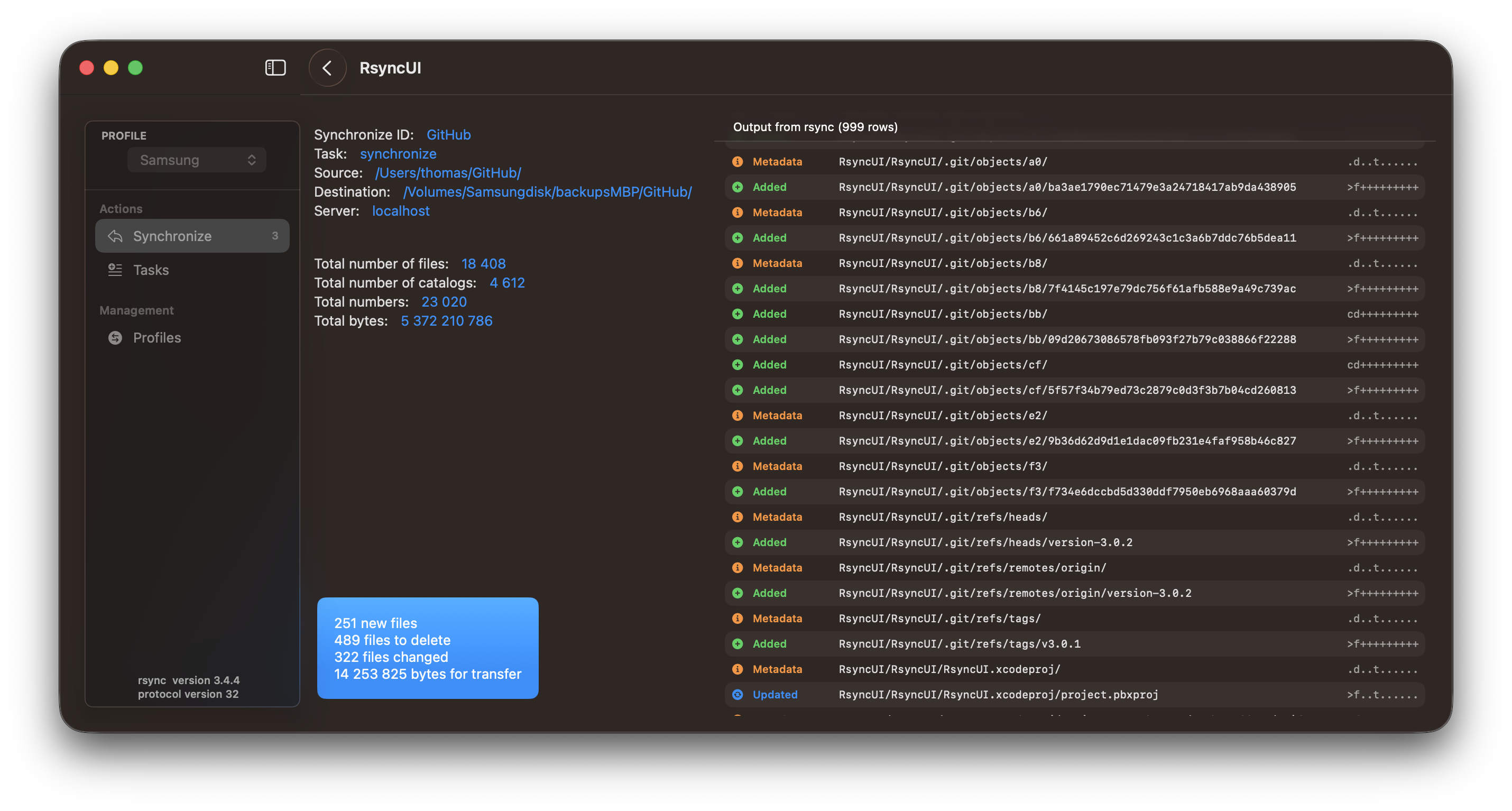
📋 Improved rsync output
- Added structured presentation of itemized rsync output.
- Changes are classified as added, updated, deleted, metadata-only, or other.
- Added colored icons and clearer file paths for each change.
- Added support for both rsync and openrsync output formats.
- Automatically enables –itemize-changes during synchronization, estimation, and verification.
- Ensures the option is added only once and does not modify saved task parameters.
🗓️ More reliable scheduling
- Fixed duplicate daily and weekly schedules after recomputation or application restart.
- Improved persistence by storing schedule definitions instead of generated occurrences.
- Fixed schedule calculation across month and year boundaries.
- Schedules are now limited correctly through the end of the following month.
- Invalid, expired, and out-of-range dates are rejected.
- Prevented duplicate schedule definitions.
- Deleting the earliest schedule now correctly activates the next one.
- Deleting the final schedule clears the timer and next-schedule state.
- Improved handling and deletion of schedules missed while the Mac was asleep.
- Schedule selections are cleared after deletion.
🧹 Interface improvements
- Removed the redundant reset-selection toolbar button from the log-record view.
- Simplified itemized-output detection.
- Corrected the schedule-type picker value binding.
- Minor cleanup of the log statistics chart implementation.
✅ Testing
- Added scheduler tests covering deletion, deduplication, persistence, date validation, and year boundaries.
- Added tests for itemized rsync output parsing.
- Added tests ensuring –itemize-changes is inserted correctly and only once.
- Added a dedicated schedule test tag.
🔧 Maintenance
- Updated the application and widget version to 3.0.2 (build 196).
- Updated release and download references for the 3.0 series.
- Updated development documentation.
- Diff summary: 25 files changed, 591 insertions, and 229 deletions.
Version 3.0.0
Version 3.0.0 - May 14, 2026
Bugfix: Resolved the issue with adding tasks. Additionally, removed an annoying message regarding the missing configuration file.
The bug was caused by incorrect use of Swift concurrency in the Add function. The add and update tasks are asynchronous functions running on the @MainActor. The update was triggered by an unstructured task that completed after the caller was completed and cleared the values, causing the error.
To fix this, use structured concurrency with await. Await suspends execution until the async function completes.
Mastering Swift concurrency is challenging, and I’m learning daily. Swift concurrency and actor isolation in RsyncUI are minimized, but some model updates remain. I’m developing another app where Swift concurrency and actor isolation are essential, demonstrating mastery and highlighting areas for further learning.
Version 2.9.8
Version 2.9.8 - May 12, 2026
In this release, there are a few minor UI updates. If you prefer the update without the UI updates, please inform me, and I can create an updated version without the UI updates.
This version primarily focuses on refactoring and cleaning up the model component of RsyncUI. Additionally, there are some updates to the main Synchronize and Tasks view. There are more internal updates planned, and the next and hopefully final cleanup of the code is scheduled for June or July.
A comprehensive release notes detailing all model updates in this release is available. The detailed release notes can be accessed at the RsyncUI main repository on GitHub. The changelog is generated by AI after reviewing all Git commits and modifications to the source code.
Next version represents a substantial internal refactor, primarily focusing on enhancing the application’s codebase. RsyncUI has been in development and maintenance since late 2020, spanning over five years. It is imperative to maintain the source code’s up-to-date status to ensure the continued development and maintenance of the application. During this period, I have experienced a significant learning curve, particularly through the development of my latest application, RawCull, a culling app designed for raw files (photo app).
In the past year, artificial intelligence (AI) has emerged as an increasingly indispensable and valuable tool in the development process. For this version of RsyncUI, both GitHub’s copilot-cli and ChatGPTs codex terminal clients have proven instrumental in facilitating this cleanup effort.